
Barcode Scanner Simulator
Turn your phone into a wireless barcode scanner, or set up hotkeys for custom barcodes - no physical scanner required.
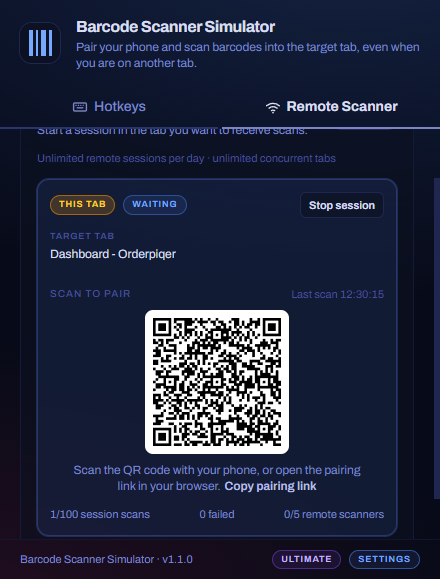
Use your phone as the scanner.
No barcode scanner on hand? Pair your phone once and scan into any tab in your Chrome browser.
- 01
Start remote scanner mode
In Chrome, open the extension on the tab where scans should land and start a remote scanner session.
- 02
Pair your phone
Scan the QR code in the popup (or open the pairing link). Your phone connects securely - no short code to type.
- 03
Scan with your camera
Point your phone at a barcode. The value is sent to the extension and typed into the focused field, like a USB scanner.
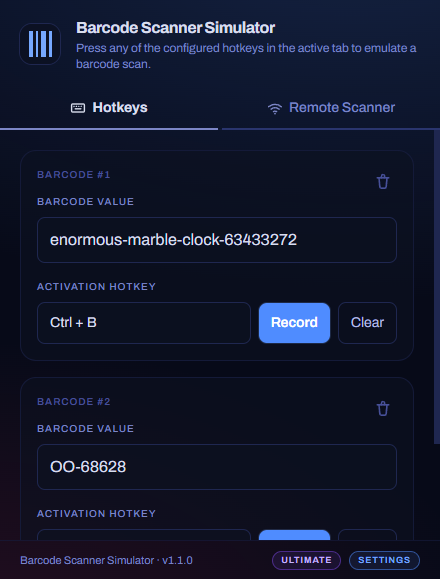
Scan with a keyboard shortcut.
Perfect when you already know the codes you use often. Set them up once and fire each barcode from the tab you are working in.
- 01
Save a barcode and hotkey
Open the extension, enter the barcode value you need, and record the keyboard shortcut that should trigger it.
- 02
Focus the target field
Click into the input on the web page - checkout, inventory, admin form, or anywhere a scanner would type.
- 03
Press your hotkey
The extension types prefix, barcode, suffix, and terminator at scanner speed - no USB wedge required.
Configure once. Scan anywhere.
Save the barcodes you use often and fire them with a keyboard shortcut - or open remote scanner mode and let your phone camera do the scanning when that is easier.
Global hotkey activation
Press a saved shortcut to send a scan into the focused tab or app.
Unlimited barcode mappings
Keep one barcode on Free, or save every SKU, coupon, and login code you need with Pro.
Scanner-like timing
Add a delay before the scan and between characters for stricter forms.
Prefix · suffix · terminator
Send Enter, Tab, CR, LF, CRLF, or custom text around each value.
Phone as a remote scanner
Pair your phone with a QR code and scan into the Chrome tab you choose - handy when you are away from a desk scanner.
Per-tab scans in Chrome
Hotkey and remote scans stay in the tab you are using, including embedded frames.
Pricing
Start free. Pro unlocks unlimited custom barcodes/hotkeys and higher limits for Remote Scanner.
Free
One barcode with customizable hotkey plus limited Remote Scanner.
- 1 barcode mapping with customizable hotkey
- Limited Remote Scanner mode
- Remote Scanner: 3 sessions/day, 1 concurrent tab, 1 connected phone, 10 scans per session
Pro
Unlimited hotkey barcodes and higher remote scan limits.
- Everything in Free, plus:
- Unlimited barcodes & hotkeys
- Advanced scanner settings: timing, prefix, suffix, and terminator
- Remote Scanner: 30 scans per session
Ultimate
For warehouse workers who need to scan a lot of barcodes.
- Everything in Pro, plus:
- Concurrent tabs - run Remote Scanner in multiple Chrome tabs at once
- Remote Scanner: unlimited sessions/day, 5 connected phones, 100 scans per session
Frequently Asked Questions
It sends barcodes into whatever field you are using - like a USB scanner would. Assign a hotkey to each saved barcode and press it when you need a scan, or pair your phone and use its camera as a wireless remote scanner in Chrome.
Anyone who needs barcode input without dedicated hardware: shop staff, inventory volunteers, small-business owners, students, hobbyists, and teams testing web apps. If you already know the codes you need, hotkeys are fastest; if you prefer your phone, remote scanner mode has you covered.
Many apps expect scanner-like typing, not one instant paste. The simulator can send characters one by one, with timing that is closer to real hardware.
The Chrome extension works in web pages today - hotkeys and remote phone scanning. A desktop app for Windows, macOS, and Linux is in development for native apps.
Yes, with Pro. You can add custom text before or after the barcode, choose the ending key, and tune scan timing.
Free supports one barcode mapping with its own hotkey. Pro unlocks unlimited mappings, each with its own shortcut.
Remote scanner mode pairs your phone to a Chrome tab via QR code. Free: 3 sessions per UTC day, 1 concurrent tab, 1 connected phone per session, 10 barcode scans per session. Pro: same daily and tab limits, 1 phone per session, 30 scans per session (plus unlimited hotkey mappings and advanced timing). Ultimate: unlimited sessions per day, unlimited concurrent tabs, up to 5 phones per session, and 100 scans per session. Starting a new session resets the per-session scan counter.
Barcode values and settings stay local. The extension only calls our site to verify license entitlements and to mint short-lived tokens for Remote Scanner mode.
No. Pro is a one-time purchase for unlimited barcode mappings and advanced scan settings. Ultimate is a separate monthly subscription that lifts remote scanner limits (unlimited daily sessions and tabs, more connected phones, and more scans per session).
Try Barcode Scanner Simulator today.
Install the Chrome extension in 30 seconds, save your first barcode, and scan with a hotkey - or pair your phone and use it like a wireless scanner. The desktop app for native software is coming soon.